Cost reporting
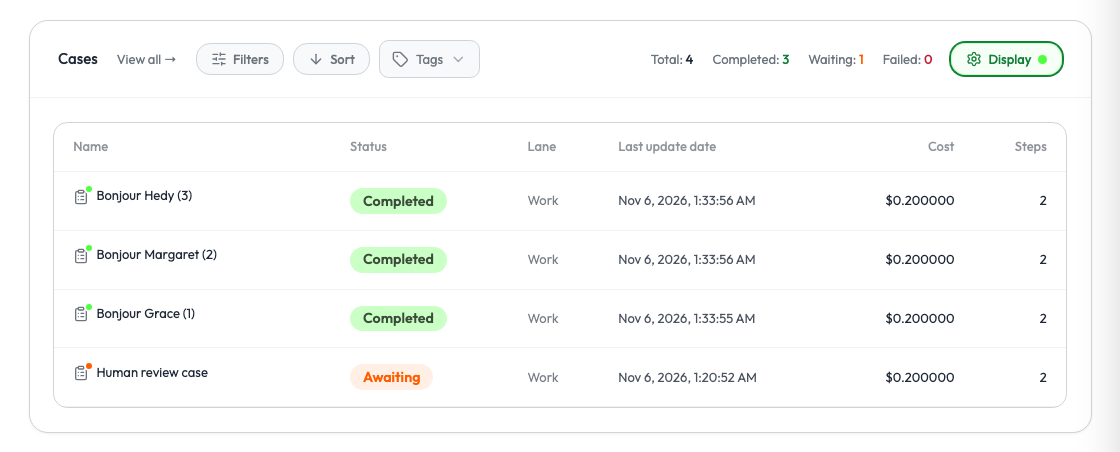
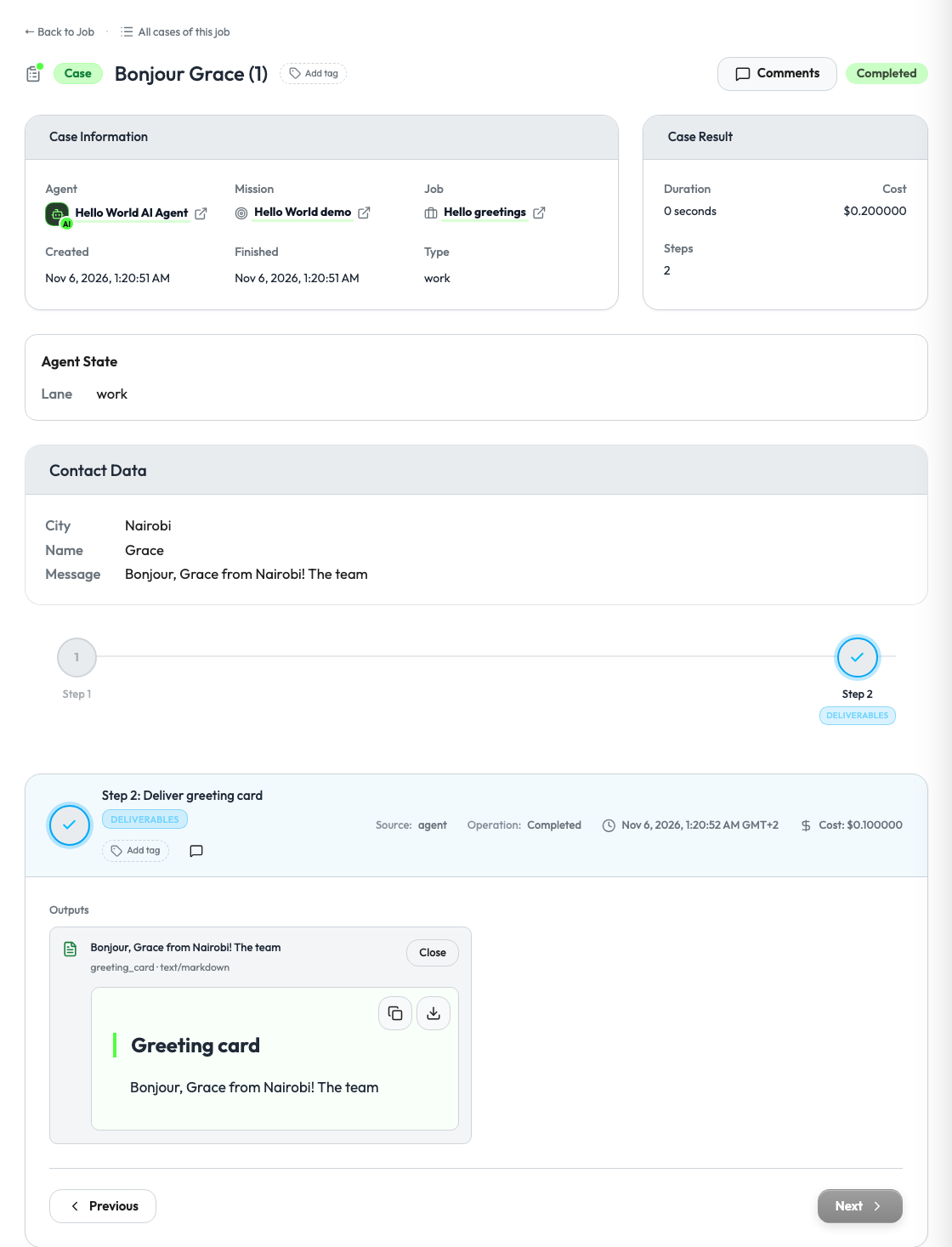
Operators want to know what a job costs. Your agent reports the cost of each step and the total of the job, and Studio shows them on the job page, on each case and in its own dashboards.
Install the Supervaizer integration skill in your coding agent, open your agent project and ask:
Add cost reporting to this agent.
The skill asks you the design questions, then follows this guide and the Hello World example, with tests. The rest of this page is what it reads.
The three numbers
| Level | Where your agent puts it | What Studio does |
|---|---|---|
| Step | cost on the step | Shows it on the step |
| Case | nothing | Adds up the step costs of the case |
| Job | information.cost.total_cost on the job | Shows it as the job cost |
Studio does not add the case costs up into the job cost. Report the job total yourself. Without it, the job shows no cost.
Report the costs
Costs are numbers in US dollars.
def job_snapshot(job_id: str, request: V2ActionRequest, status: str, cases: list[dict]) -> dict:
    total_cost = round(sum(step.get("cost", 0) for case in cases for step in case["steps"]), 2)
    return {
        "id": job_id,
        "agent_slug": request.agent_slug,
        "mission_id": request.mission_id,
        "status": status,
        "source": {"type": "fresh_start"},
        "information": {"cost": {"total_cost": total_cost}},
    }


case = {
    "id": "job-1-case-1",
    "lane": "work",
    "title": "Hello Ada (1)",
    "status": "completed",
    "steps": [
        {"id": "job-1-case-1-start", "activity": "operation", "status": "completed", "title": "Start", "cost": 0.10},
        {"id": "job-1-case-1-say-hello", "activity": "operation", "status": "completed",
         "title": "Deliver greeting card", "cost": 0.10},
    ],
}
What to count
Decide this with the person who pays:
- Model calls: tokens in and out, at the price of your provider.
- Paid tools: search, voice minutes, messages, data providers.
- Nothing else. Your own servers and your margin are not the cost of a step.
Report the cost when the step ends, with the real numbers. If a step can run for a long time, update its cost at each sync.
Report a cost of 0 for a step that is free. A missing cost and a free step look the same to an operator, and only one of them is true.
Say the cost before the job starts
An agent with a guided setup can show an estimate before the operator confirms. The estimate is a range, or it is unknown. It is never a false exact number.
from supervaizer import V2CostEstimate

V2CostEstimate(status="estimated", unit="USD per interview", min=12, max=20,
               basis="the middle half of the last 40 completed interviews")

V2CostEstimate(status="unknown", basis="fewer than 3 completed interviews yet")
Return it in the setup_plan of your job.start.preview action. Guided setup shows how to declare that action. See "Setup plan and field schema" in the SDK guide.
Bill the workspace for the work
Cost reporting informs. Billable consumption charges: the agent declares what it sells, the owner workspace sets the prices in Studio, and the agent reports the quantities.
from datetime import UTC, datetime
from decimal import Decimal

from supervaizer import Agent, BillableConsumption

agent = Agent(
    name="Research Agent",
    version="1.0.0",
    supervaizer_v2_registration=registration,
    billing_catalog=[{"sku": "brief", "unit": "brief", "description": "One sourced brief"}],
)

account.report_consumption_sync(
    [
        BillableConsumption(
            sku="brief",
            quantity=Decimal("1"),
            unit="brief",
            job_id=job_id,
            case_id=case_id,
            idempotency_key=f"{case_id}:brief",
            occurred_at=datetime.now(UTC),
        )
    ],
    agent_slug=agent.slug,
)
The idempotency_key makes a repeated report count once. This needs Supervaizer 1.10 or later.
The call returns one receipt for each record, in the order sent:
accepted: Studio booked the record.duplicate: Studio has thisidempotency_keyalready. Nothing is booked twice.rejected: Studio booked nothing.reasonsays why. A rejection is final: do not send the record again.
A batch holds 1 to 200 records. Report the work when it is final. Studio has no update or delete for a record. The full contract is in Billable consumption.
Checklist
- Every step has a
cost, and free steps say0. - The job snapshot has
information.cost.total_cost. - The total is computed again on each job state, so it follows the steps.
- An estimate is a range or unknown.
Reference
- Hello World:
STEP_COSTand_job_snapshotinagent_v2.py. - To chart costs over time, add a dataset to your analytics dashboard.