Human in the loop
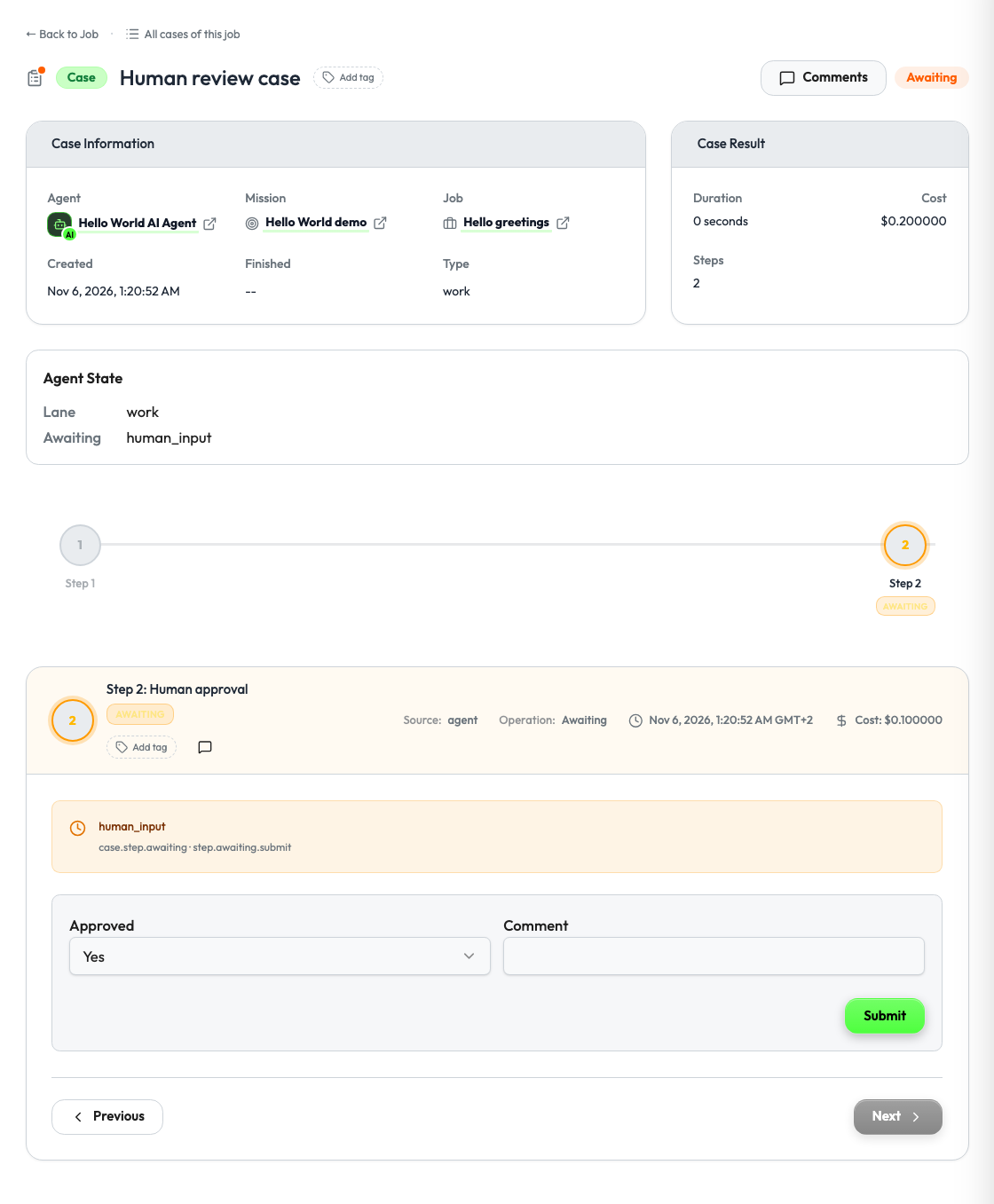
A step can wait for a person. Studio shows the waiting step in the operator's Actions Panel, draws the form that your agent describes, and sends the answer back to your agent.
Install the Supervaizer integration skill in your coding agent, open your agent project and ask:
Add a human approval before the step that cannot be undone.
The skill asks you the design questions, then follows this guide and the Hello World example, with tests. The rest of this page is what it reads.
When to add it
Add a human step when one of these is true:
- The step has an effect that cannot be undone: it sends a message, spends money, deletes or publishes something.
- The agent is not sure: the confidence is low, the sources disagree, the input is incomplete.
- A person is responsible for the result: legal, medical, financial or brand content.
- The agent needs information that only a person has.
Do not add it to every step. A job that always waits is a job that nobody starts.
How it works
- Your agent returns a step with
status: "awaiting"and anawaitingobject. - Studio loads the surface named in
awaiting.surfaceand draws the form. - The operator answers. Studio invokes the action named in
awaiting.actionwith the values. - Your agent completes the step and returns the new job state.
Human input is a status, not a special kind of step.
1. Declare the surface and the action
registration = build_v2_agent_registration(
    agent_slug="my-agent",
    display_name="My Agent",
    a2ui_catalog_version="my-agent-ui.1",
    surfaces=["job.start", "case.step.awaiting"],
    actions=["job.start", "job.sync", "job.stop", "step.awaiting.submit"],
)
2. Return a waiting step
APPROVAL_FIELDS = [
    {"id": "approved", "label": "Approved", "type": "boolean", "required": True},
    {"id": "comment", "label": "Comment", "type": "text"},
]

def review_case(case_id: str) -> dict:
    return {
        "id": case_id,
        "lane": "work",
        "title": "Human review case",
        "status": "awaiting",
        "metadata": {},
        "steps": [
            {"id": f"{case_id}-start", "activity": "operation", "status": "completed", "title": "Start"},
            {
                "id": f"{case_id}-approval",
                "activity": "operation",
                "status": "awaiting",
                "title": "Human approval",
                "awaiting": {
                    "reason": "human_input",
                    "surface": "case.step.awaiting",
                    "action": "step.awaiting.submit",
                    "fields": APPROVAL_FIELDS,
                },
            },
        ],
    }
Set the job status to awaiting while a case waits. The fields use the field definitions of every form.
3. Describe the form
Studio calls the surface with the case_id and the step_id of the waiting step.
@sv_server.v2_surface("case.step.awaiting", agent_slug=agent.slug)
def awaiting_form(request: V2SurfaceRequest) -> dict:
    return {
        "surface": request.surface,
        "document": {
            "type": "Form",
            "id": "my_agent.case.step.awaiting",
            "title": "Human approval",
            "fields": [
                {"id": "approved", "label": "Approved", "type": "boolean", "default": True},
                {"id": "comment", "label": "Comment", "type": "text", "required": False},
            ],
            "submit": {"action": "step.awaiting.submit", "label": "Submit"},
            "state": {"case_id": request.case_id, "step_id": request.step_id},
        },
    }
Show the person what they decide on. Put the draft, the amount or the recipient in the form title, in a read_only field or in the case metadata.
4. Handle the answer
@sv_server.v2_action("step.awaiting.submit", agent_slug=agent.slug)
def submit_answer(request: V2ActionRequest) -> dict:
    job_state = JOBS[request.job_id]
    for case in job_state["cases"]:
        if case["id"] == request.case_id:
            case["status"] = "completed"
            case["metadata"].update(
                approved=bool(request.input.get("approved", True)),
                comment=str(request.input.get("comment") or ""),
            )
            for step in case["steps"]:
                step["status"] = "completed"
                step.pop("awaiting", None)
    if all(case["status"] == "completed" for case in job_state["cases"]):
        job_state["job"]["status"] = "completed"
    return {
        "status": "ok",
        "effects": [{"type": "step.awaiting.submitted", "job_id": request.job_id,
                     "case_id": request.case_id, "step_id": request.step_id}],
        "job_state": job_state,
    }
Decide what a refusal does. When approved is false, the agent can stop the case, try again with the comment, or ask a second question with a new waiting step.
Options
Ask for a file
{
  "id": "report_file",
  "label": "Report (.md)",
  "type": "file",
  "accept": ".md,text/markdown",
  "max_bytes": 1048576,
  "storage": "studio",
  "required": true
}
With storage: "studio", Studio keeps the file and your agent receives a reference (file_id, filename, media_type, size, sha256). With storage: "inline", the answer holds filename, media_type, size, encoding and content. The whole action request must stay under the request body limit of Studio, so keep the file small.
To show the stored file as an output, put its file_id in the output of a step:
{"id": "report:1", "type": "report", "title": "Quarterly report",
 "media_type": "text/markdown", "storage": "studio", "file_id": "<studio file id>"}
Studio serves this output from its own storage. It does not call your artifact.get action. See the SDK guide.
Let the person change the answer
Add "reopenable": true to the awaiting object. Studio then lets the operator open an answered step again and submit new values.
Review a document
For a text that a person reads and corrects, the surface can return a DocumentReview document in place of a Form. See the SDK guide.
Checklist
-
case.step.awaitingis insurfacesandstep.awaiting.submitis inactions. - The waiting step has
status: "awaiting"and anawaitingobject withreason,surfaceandaction, and withfieldsfor a form. - The form shows what the person decides on.
- The submit action checks the values, completes the step and returns the job state.
- A refusal has a defined result.
Reference
- Hello World: the review case in
agent_v2.pyandtests/test_hitl.py. - To pause a step by a mission rule and not by your own logic, see Guardrail controls.