Agent parameters and secrets
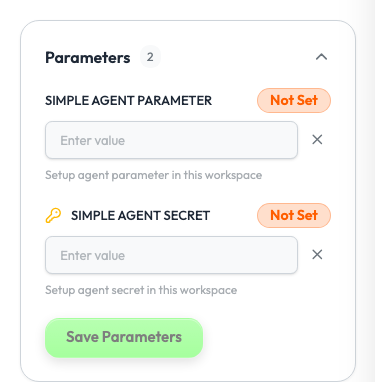
A parameter is a setting that your agent needs and that the workspace provides once: an API key, a model name, a sender address. A workspace admin sets the values in Studio. Your code never holds them.
Install the Supervaizer integration skill in your coding agent, open your agent project and ask:
Move the API keys and settings of this agent to Supervaize parameters.
The skill asks you the design questions, then follows this guide and the Hello World example, with tests. The rest of this page is what it reads.
Which setting goes where
| The value | Use | Set by | When |
|---|---|---|---|
| is the same for all jobs of the workspace | Parameter (this page) | Workspace admin | Once, on the agent page |
| changes for each job, and is known at the start | Start form field | Operator | When the job starts |
| changes for each job, and is edited later | Configure screen | Operator | Any time on the job page |
| belongs to your deployment, not to a workspace | Environment variable of the controller | You | At deployment |
Declare the parameters
from supervaizer import Agent, Parameter, ParametersSetup

parameters = ParametersSetup.from_list([
    Parameter(
        name="OPENAI_API_KEY",
        description="API key the agent uses to call the model",
        is_environment=True,
        is_secret=True,
        is_required=True,
    ),
    Parameter(
        name="MODEL_NAME",
        description="Model used for the research step",
        is_environment=True,
    ),
])

agent = Agent(
    name="My Agent",
    version="0.1.0",
    description="Describe what your agent does.",
    parameters_setup=parameters,
    supervaizer_v2_registration=registration,
)
| Key | Meaning |
|---|---|
name | The name your code uses. |
description | The text Studio shows next to the input. |
is_secret | Studio hides the value after it is saved. |
is_required | Marks the parameter as required in Studio. |
is_environment | The controller also puts the value in os.environ[name]. |
Until an admin saves the parameters, Studio shows the agent as Pending Setup.
Read the values
The controller gets the values from Studio when it starts, after an admin configured the agent. Studio sends them encrypted. After an admin changes a value, restart the controller.
import os

api_key = os.environ["OPENAI_API_KEY"]             # with is_environment=True
model = agent.parameters_setup.value("MODEL_NAME")  # works for every parameter
Read the value when you need it, inside your action. Do not copy it into a module constant at import time: the controller loads the values after it starts.
Rules
- Never put a secret in an effect, in case
metadata, in a step title, in a log line or in an error message. - Do not ask for a secret in a start form or on a Configure screen. Those values are visible to operators and are stored with the job.
- Keep the list short. Each required parameter is one more thing an admin must do before the first job.
Checklist
- Each parameter has a
descriptionthat an admin can act on. - Secrets have
is_secret=True. - The code reads values at use time.
- No secret reaches Studio in a result.
Reference
- Hello World:
supervaizer_control.pydeclares one parameter and one secret. - Model reference:
ParameterandParametersSetup.