Shared resources
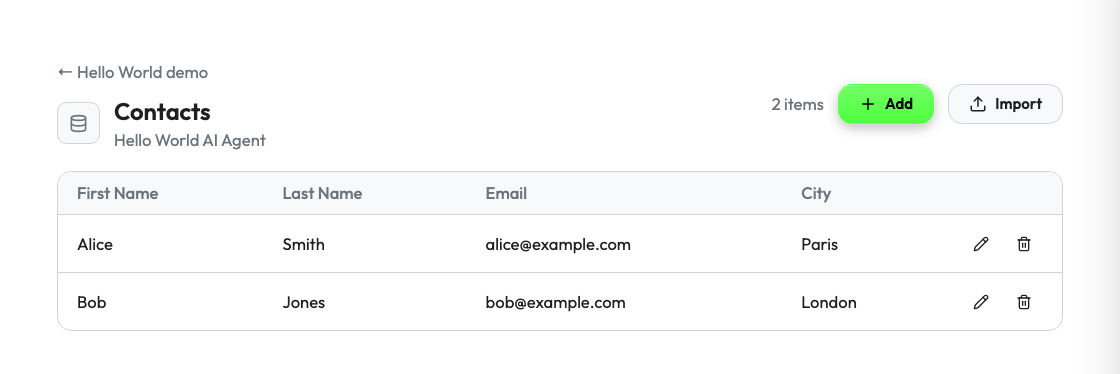
A resource is business data that your agent owns and that several jobs use: contacts, prompts, products, templates. When you declare a resource, Studio can list it, edit it and import it, and your forms can offer its items as choices. You write no user interface.
Install the Supervaizer integration skill in your coding agent, open your agent project and ask:
Make the data that several jobs share a Supervaize resource.
The skill asks you the design questions, then follows this guide and the Hello World example, with tests. The rest of this page is what it reads.
When to add one
- The same data is used by more than one job.
- Operators must see or correct the data without a developer.
- A form must let the operator choose an existing item.
Data that belongs to one job only is not a resource. Put it in the cases of the job, or on the Configure screen.
1. Declare the resource
registration = build_v2_agent_registration(
    agent_slug="my-agent",
    display_name="My Agent",
    a2ui_catalog_version="my-agent-ui.1",
    surfaces=["job.start"],
    actions=[
        "job.start", "job.sync", "job.stop",
        # A list does not change state: say so, and Studio lets viewers read it.
        V2ActionDefinition(id="resource.contacts.list", mutating=False, scope="workspace"),
    ],
    resources=[
        {
            "id": "contacts",
            "label": "Contacts",
            "scope": "workspace",
            "auto_surface": True,
            "operations": ["list", "create", "update", "delete", "import"],
            "display": {
                "title_field": "email",
                "columns": ["first_name", "last_name", "email", "city"],
                "search_fields": ["first_name", "last_name", "email", "city"],
            },
            "fields": [
                {"id": "first_name", "label": "First name", "type": "string", "required": True},
                {"id": "last_name", "label": "Last name", "type": "string"},
                {"id": "email", "label": "Email", "type": "email"},
                {"id": "city", "label": "City", "type": "string"},
            ],
        }
    ],
)
| Key | Meaning |
|---|---|
id | The name of the resource in action ids and in forms. |
scope | Who shares the data: workspace (all missions), mission or job. |
operations | What Studio may do: list, get, create, update, delete, import. |
auto_surface | Studio builds the table and the forms from display and fields. |
display | The title field, the table columns and the search fields. |
fields | The form fields, with the usual field definitions. |
requires_context | The context that a call needs. The default is ["workspace.id"]. |
mounted_views | Replaces a generated view, such as edit or import, with a surface of your agent: {"view": "import", "surface": "..."}. |
The SDK derives one action for each operation, named resource.<id>.<operation>, and the surface mission.agent.resource.<id>.
2. Handle the operations
Register one handler for the derived actions, and return one effect for each operation.
CONTACT_ACTIONS = [f"resource.contacts.{op}" for op in ("list", "create", "update", "delete", "import")]

def handle_contacts(request: V2ActionRequest) -> dict:
    workspace_id = request.workspace_authorization.workspace_id  # verified by the SDK
    store = contacts_of(workspace_id)
    data = request.input
    operation = request.action.rsplit(".", 1)[1]

    if operation == "list":
        items = store.all()
        effect = {"type": "resource.listed", "count": len(items), "items": items}
    elif operation == "create":
        effect = {"type": "resource.created", "item": store.create(data)}
    elif operation == "update":
        item = store.update(data.get("id"), data)
        if item is None:
            return error("Contact not found")
        effect = {"type": "resource.updated", "item": item}
    elif operation == "delete":
        if not store.delete(data.get("id")):
            return error("Contact not found")
        effect = {"type": "resource.deleted", "item": {"id": data.get("id")}}
    else:  # import
        created = store.create_many(data.get("records") or [])
        effect = {"type": "resource.imported", "count": len(created), "items": store.all(), "errors": []}

    return {"status": "ok", "effects": [{"resource": "contacts", **effect}]}


def error(message: str) -> dict:
    return {"status": "error", "effects": [{"type": "resource.action.failed", "resource": "contacts", "message": message}]}


for action in CONTACT_ACTIONS:
    sv_server.register_v2_action(action, handle_contacts, agent_slug=agent.slug)
Each item needs a string id. Create the id on the agent side and ignore an id that comes with a create.
3. Use the resource in a form
A resource_ref field lets the operator choose one item. Studio loads the choices with the list action.
{
    "id": "contact_id",
    "label": "Contact",
    "type": "resource_ref",
    "required": True,
    "options_source": {"type": "resource", "resource": "contacts", "value_field": "id", "label_field": "email"},
}
Your action receives the id of the chosen item. Load the item from your store; do not trust other values from the form.
Keep the data of each workspace apart
The same controller can serve several workspaces. A resource handler must never return the data of another workspace.
- Take the workspace from
request.workspace_authorization. The SDK verified it from a token that Studio signed. - Do not use a workspace id or slug from
request.input. A caller can write any value there. - For a
missionscope, filter onrequest.mission_idtoo. request.mission, when Studio sends it, holds the missionid,nameandmetadata. Studio sends the current metadata on each request. Do not cache it. Use it to scope results, never as an access boundary. See the SDK guide.
Checklist
- The resource is in
resources, with only the operations that the handler supports. - The
listaction is declared withmutating=False. - Every operation filters on the verified workspace.
- Every operation validates its input and returns its effect.
- Forms use
resource_refwithoptions_source, not a free text field.
Reference
- Hello World:
agent_data_resource.pyand the contact actions inagent_v2.py. - A list of rows that an operator edits inside one job: the
ResourceListcomponent of the Job Configurator. - Custom edit or import screens, and the full resource contract: the SDK guide.