Guardrail controls: let mission rules decide
A mission manager writes rules for a mission in Studio, for example "do not contact a competitor" or "a person must approve each refund above 500 USD". A rule checkpoint is the moment when your agent asks Studio: "may I do this step?". Studio judges the step against the rules and answers allow, pause or stop.
Install the Supervaizer integration skill in your coding agent, open your agent project and ask:
Add guardrail controls to the steps that have an effect outside the agent.
The skill asks you the design questions, then follows this guide and the Hello World example, with tests. The rest of this page is what it reads.
Rule checkpoint or human in the loop?
| Human in the loop | Rule checkpoint | |
|---|---|---|
| Who decides that a step waits | Your agent, in its code | The mission manager, with rules in Studio |
| Same for all missions | Yes | No, each mission has its own rules |
| What the person sees | The form of your agent | The Rule activity panel of the job in Studio |
Use both when you need both: your agent asks for the missing information, and the mission decides what is allowed.
When to add it
Add a checkpoint to each step that has an effect outside your agent: it sends a message, calls a customer system, spends money, publishes or deletes. A step that only reads or computes does not need one.
How it works
- Your agent declares the checkpoint phases that it supports:
beforethe effect,afterit, or both. - When a mission has rules, Studio adds an opaque
rule_snapshotto thejob.startinput. - Before the effect, your agent sends a checkpoint with the business facts of the step. Studio answers.
allow: do the effect.stop: do not do it. The step fails. This is final.pause: wait. A person decides in Studio, then Studio calls yourrule.checkpoint.resumeaction withalloworstop.
- After the effect, your agent can send a second checkpoint with the result.
A paused step waits in the Rule activity panel of the job page. The person reads the rule and the verdict, writes a reason, and selects Approve or Deny. Run and review jobs with rules explains each decision.
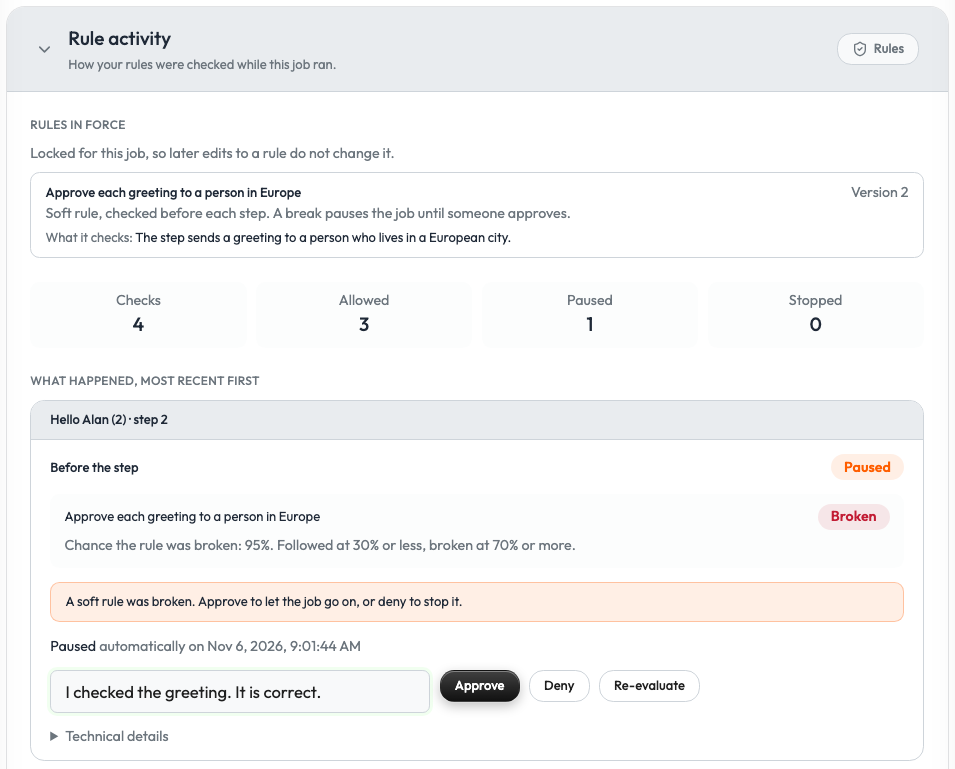
Studio starts a job in a mission with rules only if the agent declares rule checkpoints.
The workspace needs a Rule Controller before a job in a mission with rules can start. Set up rules explains how an admin configures it and writes the rules.
1. Declare the capability
registration = build_v2_agent_registration(
    agent_slug="my-agent",
    display_name="My Agent",
    a2ui_catalog_version="my-agent-ui.1",
    surfaces=["job.start", "case.step.awaiting"],
    actions=["job.start", "job.sync", "job.stop", "step.awaiting.submit"],
    rule_checkpoints={"phases": ["before", "after"], "secret_refs": ["case.metadata.customer_reference"]},
)
secret_refs is optional. It lists the paths of business secrets in your step data. Each path starts with job.fields., case.metadata., step.payload. or context.. Pass the same list to RuleCheckpointGate.from_job_start(account, request, secret_refs=...).
The SDK adds the rule.checkpoint.resume action to the registration. Register a handler for it (step 4).
2. Open the gate at job start
from supervaizer import RuleCheckpointGate

GATES: dict[str, RuleCheckpointGate] = {}

def start_job(request: V2ActionRequest) -> dict:
    job_state = build_job_state(request)
    if "rule_snapshot" in request.input:  # the mission has rules
        GATES[request.job_id] = RuleCheckpointGate.from_job_start(account, request)
        hold_guarded_steps(job_state)     # set them to "pending": nothing has run yet
    JOBS[request.job_id] = job_state
    return started(job_state)
Studio knows a case only after it received it in a job state. A checkpoint for a case that Studio does not know is refused. So return the guarded steps as pending from job.start, ask Studio for a sync, and run the checkpoints in job.sync.
The rule_snapshot is opaque. Do not read it, change it, log it or copy it into case data.
3. Ask before and after the effect
PAUSED = {"reason": "rule_checkpoint", "surface": "case.step.awaiting", "action": "rule.checkpoint.resume"}

async def run_guarded_step(gate: RuleCheckpointGate, job_id: str, case: dict, step: dict) -> None:
    ids = {"job_id": job_id, "case_id": case["id"], "step_id": step["id"]}

    decision = await gate.checkpoint(
        occurrence_id=step["id"], phase="before", **ids,
        context={"operation": "send_email", "recipient_domain": case["metadata"]["domain"]},
    )
    if decision.status == "pause":
        step["status"] = case["status"] = "awaiting"
        step["awaiting"] = dict(PAUSED)
        decision = await gate.wait_for_resume(decision, step["id"], "before", job_id=job_id, case_id=case["id"])
        step.pop("awaiting", None)
    if decision.status == "stop":
        step["status"] = case["status"] = "failed"
        return

    result = send_the_email(case)  # the effect runs only after an allow

    decision = await gate.checkpoint(
        occurrence_id=step["id"], phase="after", **ids,
        context={"operation": "send_email", "outcome": result.status},
    )
    step["status"] = case["status"] = "completed" if decision.status == "allow" else "failed"
contextholds the business facts that the rules judge: the operation, the amount, the recipient, the result. Use plain values. Do not send secrets.occurrence_ididentifies this run of the step. Use a stable value, so a retry asks about the same occurrence.- A paused step shows as
awaitingwith the reasonrule_checkpoint. The person decides in the Rule activity panel of the job page, not in a form of your agent.
wait_for_resume waits inside your process. A real agent does not block a request on it: it returns the job state with the paused step and continues when the decision arrives. The Hello World file agent_rules.py shows this complete flow.
4. Receive the decision
from supervaizer import RuleCheckpointRecoveryRequired
from supervaizer.contracts import RuleCheckpointResume
from supervaizer.rule_controls import resume_rule_checkpoint

@sv_server.v2_action("rule.checkpoint.resume", agent_slug=agent.slug)
async def resume(request: V2ActionRequest) -> dict:
    decision = RuleCheckpointResume.model_validate(
        request.input | {"job_id": request.job_id, "case_id": request.case_id, "agent_slug": request.agent_slug}
    )
    try:
        resume_rule_checkpoint(decision)
    except (ValueError, RuleCheckpointRecoveryRequired) as error:  # no matching checkpoint
        return {"status": "error", "effects": [{"type": "rule.checkpoint.rejected", "job_id": request.job_id,
                                                "message": str(error)}]}
    job_state = JOBS[request.job_id]
    return {"status": "ok",
            "effects": [{"type": "rule.checkpoint.resumed", "job_id": request.job_id}],
            "job_state": job_state}
resume_rule_checkpoint matches the decision to the waiting gate and wakes wait_for_resume. It returns None when the decision arrives before the step waits. The SDK keeps the decision for that step. It raises ValueError when the decision matches no checkpoint. It raises RuleCheckpointRecoveryRequired when no waiter of this process holds the gate. Return an error for both: never apply a decision by guess.
Studio applies the job_state that the handler returns, as for any other action. Return the state that the job has after the decision. Without it, the job stays Awaiting in Studio until the next job.sync.
Studio does not apply a state that it refuses, or a state that arrives after the agent was paused. The job then keeps its stored state until the next job.sync.
When the step continues after the answer, ask Studio for a sync: Studio then calls job.sync and shows the new state. The function schedule_refresh in the Hello World file agent_rules.py shows the request.
Keep the gate across restarts
The gate lives in memory in these examples. After a restart, the agent can no longer match a decision, and it must reject it. In production, store the rule_snapshot with your job and build the gate again from it.
The SDK also has a helper, Case.run_guarded_step(), that does the whole sequence and stores the result of each phase for a safe restart. See "Rule checkpoints" in the SDK guide.
Checklist
-
rule_checkpointslists the phases, andrule.checkpoint.resumehas a handler. - Every step with an outside effect asks
before. - The effect runs only after
allow. -
stopfails the step and is final.pauseshows the step asawaiting. - The decision handler returns the job state. The agent asks Studio for a sync when the step continues later.
- The
contexthas the facts a rule needs, and no secret. - Jobs in a mission without rules run as before.
Reference
- Hello World:
agent_rules.pyandtests/test_rule_checkpoints.py. - SDK guide: Rule checkpoints.